AI Assistant: Using "Ask Anything" for Behavioral Analysis
VillageMetrics includes two powerful AI-driven features that help you find information and get insights from your data: Journal Search and Ask Anything Chat.
Journal Search
What is Journal Search?
Journal Search is an AI-powered semantic search that finds journal entries based on meaning and context, not just exact word matches. It uses advanced vector search technology to understand what you're looking for and find relevant entries even if they don't contain your exact search terms.
How Semantic Search Works
Journal Search goes far beyond simple keyword matching. It uses AI to understand meaning, includes hashtags and author information, and intelligently boosts results based on multiple factors:
Traditional Search: Finds entries containing your exact words
- Search for "tantrum" → only finds entries with the word "tantrum"
VillageMetrics Semantic Search: Understands meaning, context, and applies intelligent ranking
- Search for "tantrum" → finds entries about meltdowns, emotional outbursts, crying fits, aggressive episodes
- Search for "bedtime struggles" → finds entries about sleep resistance, evening difficulties, nighttime challenges
- Plus hashtag search: Search "#Swimming" to find all entries tagged with swimming-related hashtags
- Plus author search: Find entries by specific caregivers who wrote them
- Plus smart boosting: Recent entries and high-quality content (funny stories, key moments, effective strategies) get prioritized
Accessing Journal Search
- Location: Bottom navigation → Search tab
- Requirements: At least some journal entries (no minimum threshold)
- Scope: Searches all journal entries for currently selected child
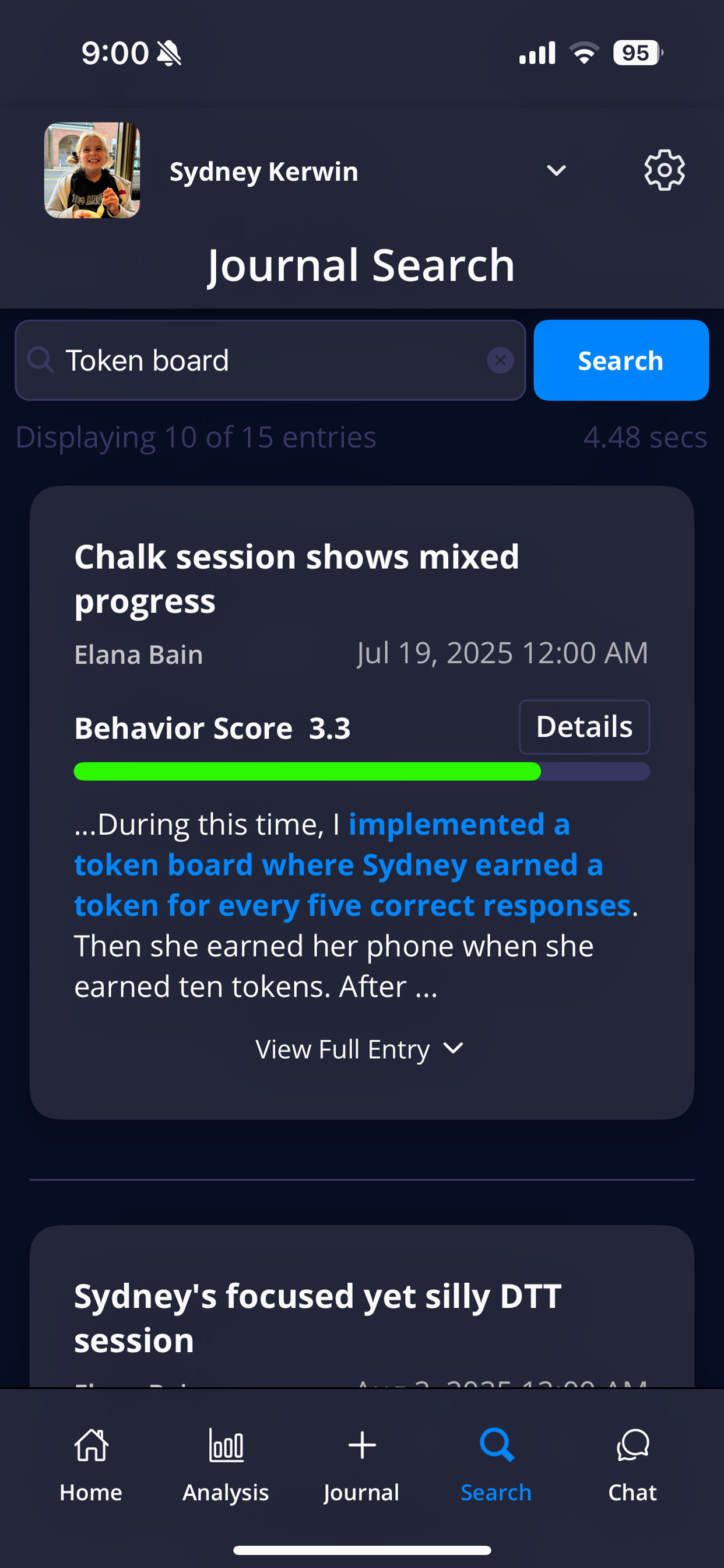
Search results show matching journal entries with relevance-based ranking and context snippets
What Gets Searched
The AI searches more than just your journal text. Every entry includes:
- Journal content: Your actual spoken/written words
- All hashtags: Every automatically generated hashtag (so you can search by hashtags)
- Author information: Who wrote the entry (parent, caregiver name and role)
This means you can search for "#Therapist entries about transitions" or "effective strategies from caregivers" and the system will understand and find relevant matches.
How Results Are Ranked
Search results use intelligent scoring that goes beyond just semantic similarity:
Recency Boosting
- Recent entries (0-3 months): Get highest priority
- Newer entries (3-6 months): Get moderate boost
- Older entries (12+ months): Get less priority
- Ancient entries (2+ years): Get slightly lower ranking
Content Quality Boosting
High-value content types get prioritized in results:
- Key moments: Significant breakthroughs or events
- Effective strategies: Successful interventions that worked
- Turnaround moments: Times when things improved unexpectedly
- Heartfelt entries: Emotionally significant experiences
- Even funny stories: Memorable, meaningful moments (though less relevant for most searches)
Smart Query Understanding
The system automatically:
- Parses dates: "last week", "this month", "two weeks ago"
- Understands content preferences: "funny moments" gets boosted to prioritize humorous entries
- Handles hashtag searches: "#Swimming" finds all swimming-related entries
- Recognizes people: "entries from therapist" or "babysitter notes"
Using Journal Search Effectively
Search Query Types
Simple Keywords:
- "swimming" → finds water activities, pool time, swim lessons
- "aggression" → finds hitting, biting, throwing, physical outbursts
- "school" → finds classroom activities, educational settings, teacher interactions
Hashtag Searches:
- "#Swimming" → finds all entries with swimming-related hashtags
- "#Meltdown" → finds all entries tagged with meltdown-related behavior
- "#Therapist" → finds all entries involving therapy sessions
Author-Specific Searches:
- "therapist notes about transitions" → finds professional observations about transitions
- "teacher reports about classroom behavior" → finds educational setting insights
- "caregiver observations about progress" → finds support team perspectives
Time-Based Searches:
- "tantrums last week" → finds recent challenging behavior episodes
- "successful strategies this month" → finds recent effective interventions
- "key moments from spring" → finds significant events from specific timeframe
Content-Quality Searches:
- "breakthrough moments" → finds significant progress or achievements
- "effective strategies" → prioritizes interventions that actually worked
- "key moments" → finds significant events or turning points
- "turnaround situations" → finds when challenging situations improved
Search Tips
Leverage Hashtag Power:
- Use hashtags for precise topic searches: "#Meltdown", "#Swimming", "#School"
- Combine hashtags with context: "#Therapist sessions about communication"
- Search multiple related hashtags: "#Anxiety #Transitions"
Take Advantage of Author Search:
- "therapist observations about progress" → finds professional insights
- "teacher reports about challenges" → finds educational setting perspectives
- "caregiver notes about strategies" → finds support team observations
Use Natural Time References:
- The system understands: "last week", "this month", "two weeks ago", "since Christmas"
- Try: "meltdowns last month" or "successful strategies this week"
Prioritize Quality Content (Gets Recency & Quality Boosts):
- Search for "breakthrough moments" to find significant progress
- Find "effective strategies" to identify interventions that actually worked
- Look for "key moments" to find important turning points
- Search "turnaround situations" for when things improved
Be Descriptive for Better Context:
- Instead of: "bad day" → Try: "emotional meltdown with hitting and screaming"
- Instead of: "bedtime" → Try: "bedtime routine struggles with resistance"
- Instead of: "swim + happy" → Try: "swimming activities where he seemed really happy"
Use Thematic Searches (Critical for Best Results):
- Combine related concepts in one search: "bedtime routine struggles with transitions" ✅
- Use separate searches for unrelated topics: Don't search "bedtime struggles swimming progress medication changes" ❌
- Keep searches focused on one theme: "successful strategies for meltdowns" works better than "successful strategies funny moments key breakthroughs"
Try Multiple Approaches for the Same Theme:
- Start broad: "school problems"
- Then get specific: "classroom meltdowns during transitions"
- Use different angles: "successful school strategies" to find what worked
Understanding Search Results
Result Format:
- Entry Title: AI-generated summary of the journal entry
- Date: When entry was created
- Author: Which village member created the entry
- Relevance Scoring: Most relevant entries appear first
- Snippet Preview: Relevant excerpt from the entry
Why Results Appear Where They Do:
- Recent entries appear higher (last 3 months get priority)
- High-quality content gets boosted (funny stories, key moments, effective strategies)
- Hashtag matches get strong relevance scores
- Author matches connect you to specific caregiver perspectives
- Semantic similarity ensures content meaning matches your search intent
Result Quality Indicators:
- High similarity scores: Results closely match your search intent
- Diverse timeframes: Results span different periods showing patterns over time
- Relevant snippets: Highlighted text shows exactly why each entry matched
- Mixed authors: Results from different caregivers provide multiple perspectives
Accessing Full Entries: Click on any result to view the complete journal entry with all details, insights, and analysis.
Advanced Search Strategies
Finding Patterns with Hashtags:
- "#Meltdown #Transition" → identify transition-related behavioral challenges
- "#Swimming #Happy" → confirm positive correlations with specific activities
- "#Therapist #Breakthrough" → track therapeutic progress and successes
Quality-Focused Pattern Analysis:
- "key moments with communication" → significant language breakthroughs
- "effective bedtime strategies" → interventions that actually improved sleep
- "breakthrough moments during therapy" → significant progress in therapeutic settings
Author-Specific Insights:
- "therapist notes about sensory issues" → professional observations on sensory processing
- "teacher reports about classroom behavior" → educational setting insights
- "caregiver observations about effective strategies" → support team insights on successful interventions
Time-Based Trend Analysis:
- "behavior improvements since medication change" → track medical intervention effects
- "swimming progress over summer" → monitor skill/enjoyment development over time
- "school adjustment this fall" → understand educational transition patterns
Ask Anything Chat
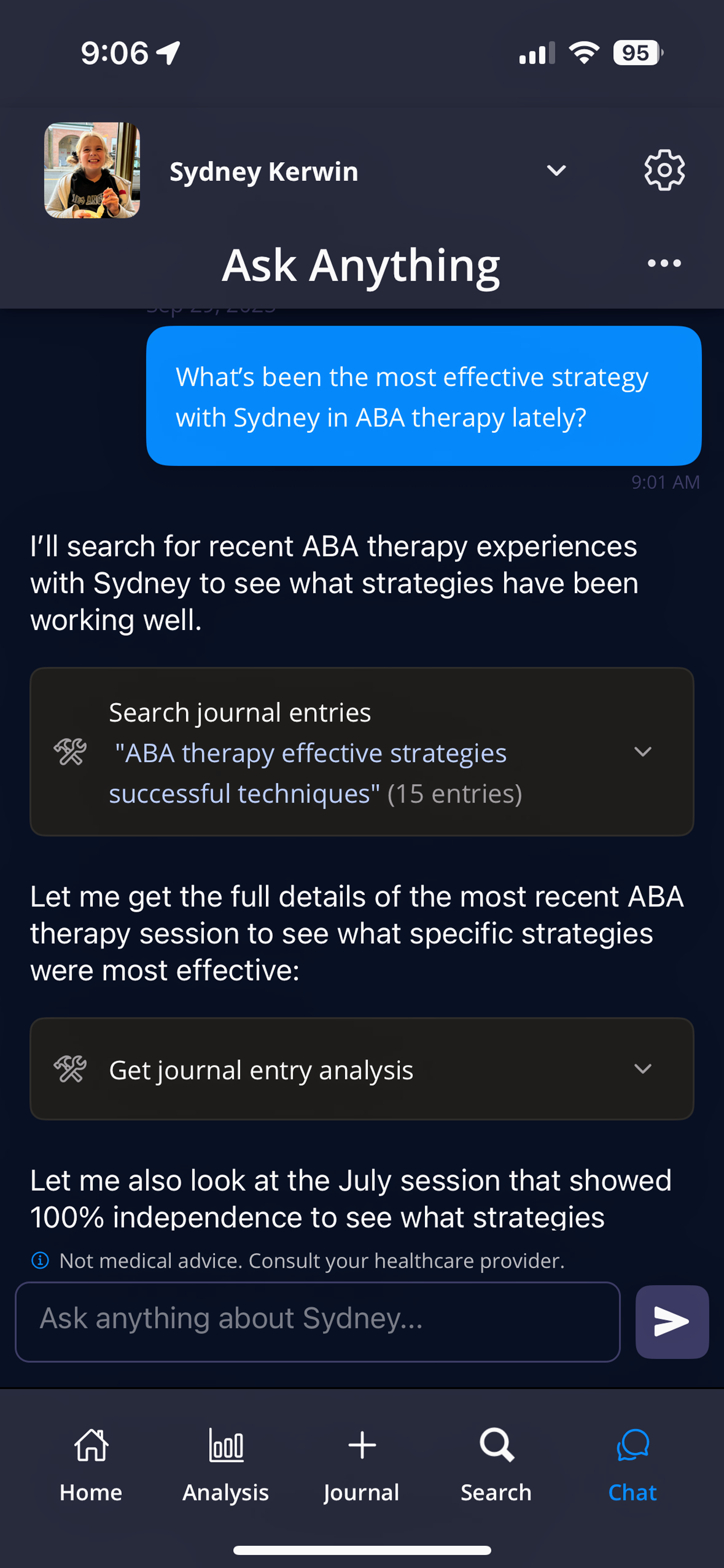
Ask Anything provides AI-powered insights about your child's data and patterns
What is Ask Anything?
Ask Anything is an AI agent that can answer questions about your child's data and help you understand patterns, trends, and insights. It has access to all your journal entries, analysis data, and app functionality information.
What Ask Anything Can Access
Your Data:
- All journal entries for currently selected child
- Complete analysis data (behavior scores, hashtags, trends)
- Medication tracking information (if configured)
- Village member information and contribution patterns
- Historical data across any time period you have entries
App Guidance:
- How to use any VillageMetrics feature
- Troubleshooting help and support
- Best practices for journaling and analysis
- Understanding your reports and insights
Types of Questions You Can Ask
Data Analysis Questions
Behavior Patterns:
- "How many tantrums has my child had this month?"
- "What activities are linked to the best behavior scores?"
- "Which days of the week are typically most challenging?"
- "How has my child's behavior changed since starting new medication?"
Trend Analysis:
- "Is my child's behavior improving over time?"
- "What's different about the days when behavior scores are highest?"
- "Are there patterns in when emotional regulation is most difficult?"
- "How does my child's behavior compare at home vs. school?"
Medication Insights:
- "How effective has the current medication been?"
- "What behavioral changes happened after the last dosage increase?"
- "Which medication period had the best outcomes?"
Caregiver Effectiveness:
- "What strategies work best for different village members?"
- "How is my child's behavior different with various caregivers?"
- "What can I learn from our most effective ABA sessions?"
Summary and Catch-Up Questions
Time Period Summaries:
- "Give me a summary of how this week has been"
- "What were the key highlights from last month?"
- "Catch me up on what's been happening while I was traveling"
Strategy Reviews:
- "What strategies have been working well for other caregivers?"
- "How should I prepare for tomorrow's doctor appointment?"
- "What should I tell the teacher about recent patterns at home?"
App Usage Questions
Feature Help:
- "How do I add a new medication?"
- "What's the difference between enriched and generic notifications?"
- "How do I change caregiver permissions?"
- "Why can't I see the analysis section?"
Understanding Reports:
- "What do the behavior scores mean?"
- "How are hashtags determined?"
- "Why is my child's medication showing as less effective?"
- "What does the coverage percentage mean in medication analysis?"
Using Ask Anything Effectively
Writing Good Questions
Be Specific:
- Instead of: "How is my child doing?"
- Try: "How has my child's emotional regulation improved since starting ABA therapy?"
Include Time Context:
- "What patterns have emerged over the past 3 months?"
- "How was this week different from last week?"
- "What changed after we started the new bedtime routine in January?"
Ask Follow-Up Questions:
- Build on previous answers in the same conversation
- Ask for more detail: "Can you give me more examples of that pattern?"
- Request specific data: "What were the exact behavior scores for those days?"
Getting the Best Responses
- Natural Language: Ask questions as you would ask a knowledgeable friend or professional
- Multiple Approaches: If one question doesn't get what you need, try rephrasing
- Combine Data and Guidance: "Based on our data, what should I focus on for next week?"
Ask Anything Limitations
Current Development Status
- Evolving Feature: Ask Anything is actively being improved based on user feedback
- Performance Varies: Some complex questions may work better than others
- Learning System: Accuracy and capabilities improve over time
What It Cannot Do
- No Medical Advice: Cannot provide medical recommendations or diagnose conditions
- No Crisis Support: Not designed for urgent situations or crisis intervention
- Limited Predictions: Cannot predict future behavior with certainty
- External Data: Only knows about data within VillageMetrics
Privacy and Feedback
Data Privacy
- Private by design: All Ask Anything interactions are treated as sensitive health information and protected accordingly
- Local Processing: Your data stays secure within VillageMetrics systems
- No External Sharing: Conversations are not shared with third parties
Providing Feedback
Help Improve the Feature:
- Use the feedback option within Ask Anything to report problems or suggestions
- Enable quality review consent to let the team review anonymized chat interactions
- Contact hello@villagemetrics.com with specific feature requests
Types of Helpful Feedback:
- Questions that didn't work as expected
- Features you wish were available
- Responses that were particularly helpful
- Technical issues or error messages
Both Journal Search and Ask Anything become more powerful as you build a larger database of journal entries. They're designed to help you unlock insights from your data that might not be immediately obvious from browsing entries or analysis reports alone.