Medication Tracking: Monitoring Efficacy and Side Effects
VillageMetrics provides comprehensive medication tracking that correlates your child's medications with behavioral outcomes, helping you make data-driven decisions about pharmaceutical interventions.
Understanding Medication Tracking
Why Medication Data Matters
Children with behavioral challenges often try multiple medications and dosage adjustments over time. Without systematic tracking, it's difficult to:
- Assess effectiveness: Determine if medications are actually helping
- Identify side effects: Notice behavioral changes that might be medication-related
- Optimize timing: Understand when medications work best
- Prepare for appointments: Provide doctors with objective data
- Make informed decisions: Have concrete data for medication changes
How It Works in VillageMetrics
- Configure medications: Set up current and historical medications with dosages and date ranges
- Record normally: Continue your regular journal entries (no additional medication-specific entries needed)
- Automatic correlation: AI analyzes behavior patterns during different medication periods
- Generate insights: Receive detailed effectiveness analysis and comparisons
Setting Up Medications
Accessing Medication Management
Location: Settings → Child Profile → Medications
Organization:
- Current Medications: Active medications (no end date)
- Past Medications: Historical medications with end dates
- Add/Edit/Delete: Full management capabilities
Adding a New Medication
Step 1: Medication Information
Medication Database Search:
- Start typing medication name
- VillageMetrics database includes commonly used medications
- Select from dropdown if available (automatically fills in medication type and classification)
Manual Entry (if not in database):
- Enter exact medication name
- Select product type: Prescription, Over-the-Counter, Other, or "I don't know"
- Choose classification from extensive list:
- Alpha-2 Agonist (e.g., Clonidine, Guanfacine)
- Antipsychotic (e.g., Risperidone, Aripiprazole)
- SSRI (e.g., Sertraline, Fluoxetine)
- Stimulant (e.g., Methylphenidate, Amphetamine)
- Anti-seizure (e.g., Lamotrigine, Valproic Acid)
- [Many other classifications available]
- Other or "I don't know" options available
Step 2: Date Ranges
Start Date: When medication was first started
- Can backdate for historical medication tracking
- Essential for correlating with existing journal entries
End Date:
- Leave blank if child is still taking medication
- Enter specific date when medication was discontinued
- Used to define medication periods for analysis
Step 3: Dosage Configuration
Flexible Dosing Schedule: Configure AM, Midday, and PM dosages independently
For Each Dose Time:
- Enable/Disable: Choose whether child takes medication at this time
- Amount: Enter numerical dose (e.g., 2.5, 10, 25)
- Units: Select from dropdown (milligrams, grams, milliliters, tablets, etc.)
Examples:
- AM only: 10 mg Methylphenidate, no midday or PM doses
- AM and PM: 0.5 mg Risperidone morning, 1.0 mg evening
- Three times daily: 2.5 mg morning, 2.5 mg midday, 5.0 mg evening
Medication Changes and Historical Tracking
New Medication Period: Any change creates a new "medication cocktail"
- Starting a new medication
- Stopping an existing medication
- Changing dosage of current medication
- Changing timing (AM to PM, adding midday dose, etc.)
Why Periods Matter: Analysis compares behavior during different medication combinations and dosages to identify what works best.
Backfilling Historical Data
Retroactive Entry: You can add medications that started before you began using VillageMetrics
- Set accurate start/end dates
- Analysis will recalculate to include historical medication periods
- Particularly valuable if you have several months of journal entries already
Analysis Updates:
- Medication analysis regenerates overnight after changes
- Requires at least one new journal entry to trigger update
- New medication data appears in analysis the next day
Medication Analysis
Accessing Medication Analysis
Location: Analysis → Medications tab
Prerequisites:
- At least 5 days of journal entries (same as other analysis)
- Medication data configured for the selected time period
- Journal entries that overlap with medication periods
Behavior Score Trend with Medication Changes
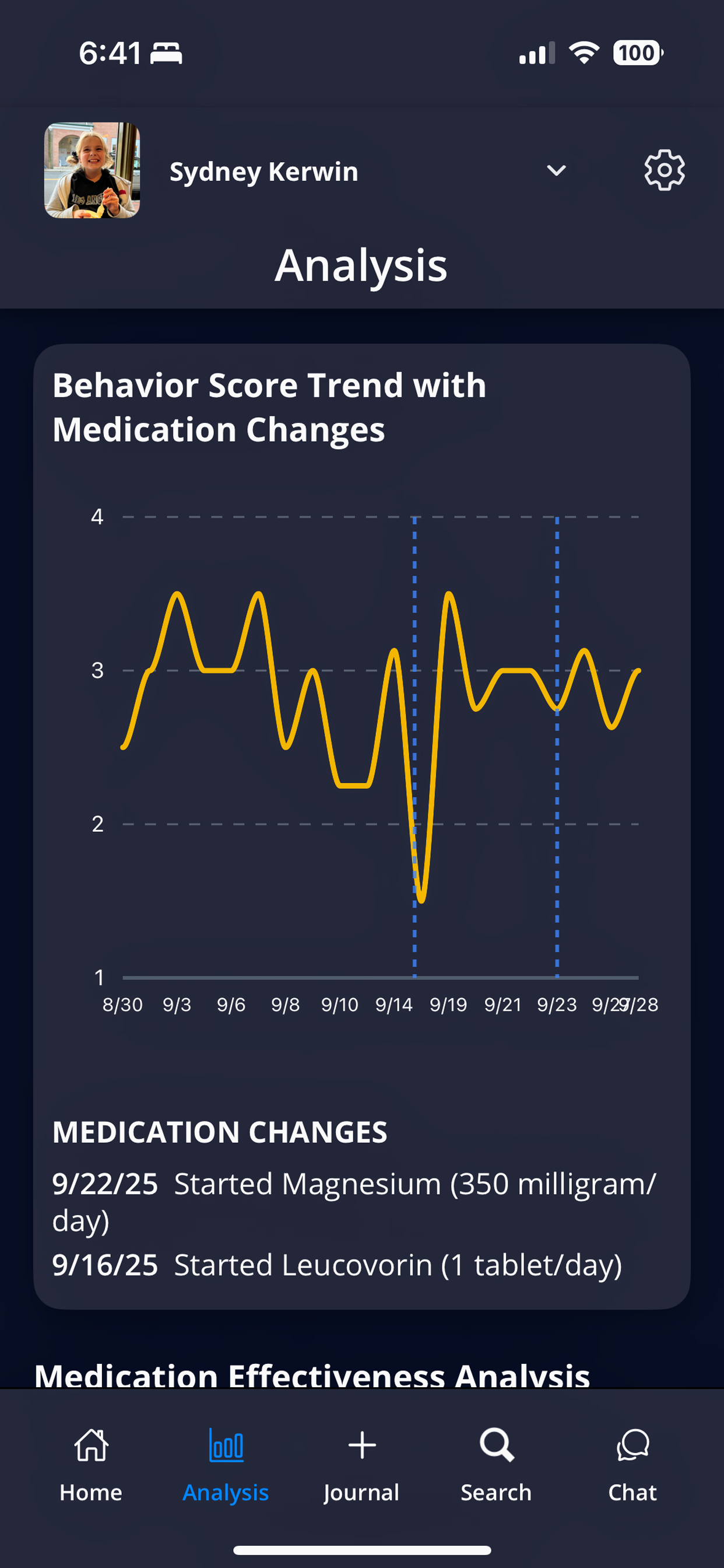
Behavior score trends with medication change markers help visualize the impact of medication adjustments
When This Chart Appears: Only shown if there was at least one medication change during the selected time period
Chart Features:
- Behavior trend line: Daily behavior scores over time
- Medication change markers: Vertical lines indicating when medications changed
- Change descriptions: Text showing what medication changed and when
- Visual correlation: Easy to see if behavior improved/declined after medication changes
How to Interpret:
- Look for behavior improvements or declines following medication change lines
- Consider other factors that might affect behavior during the same period
- Multiple medication changes may make individual effects harder to isolate
Medication Effectiveness Analysis
Medication Cocktails: Each unique combination of medications and dosages is analyzed separately
For Each Medication Period:
- Duration: Number of days this medication combination was active
- Coverage: Percentage of days with journal entries (data quality indicator)
- Average Behavior Score: Mean score during this medication period
- Comparison Metrics: Performance vs. previous medication and vs. all medications
Sorting Options:
- Most Recent (default): Chronological order, newest first
- Most Effective: Highest behavior scores first
- Least Effective: Lowest behavior scores first
Detailed Medication Information
Expandable Details for each medication period:
- Dosage Breakdown: Morning, midday, and evening doses with specific amounts and units
- Dosage Changes: Shows increases/decreases from previous periods
- Key Behavior Patterns: Specific behavioral improvements or concerns during this medication period
Key Behavior Patterns
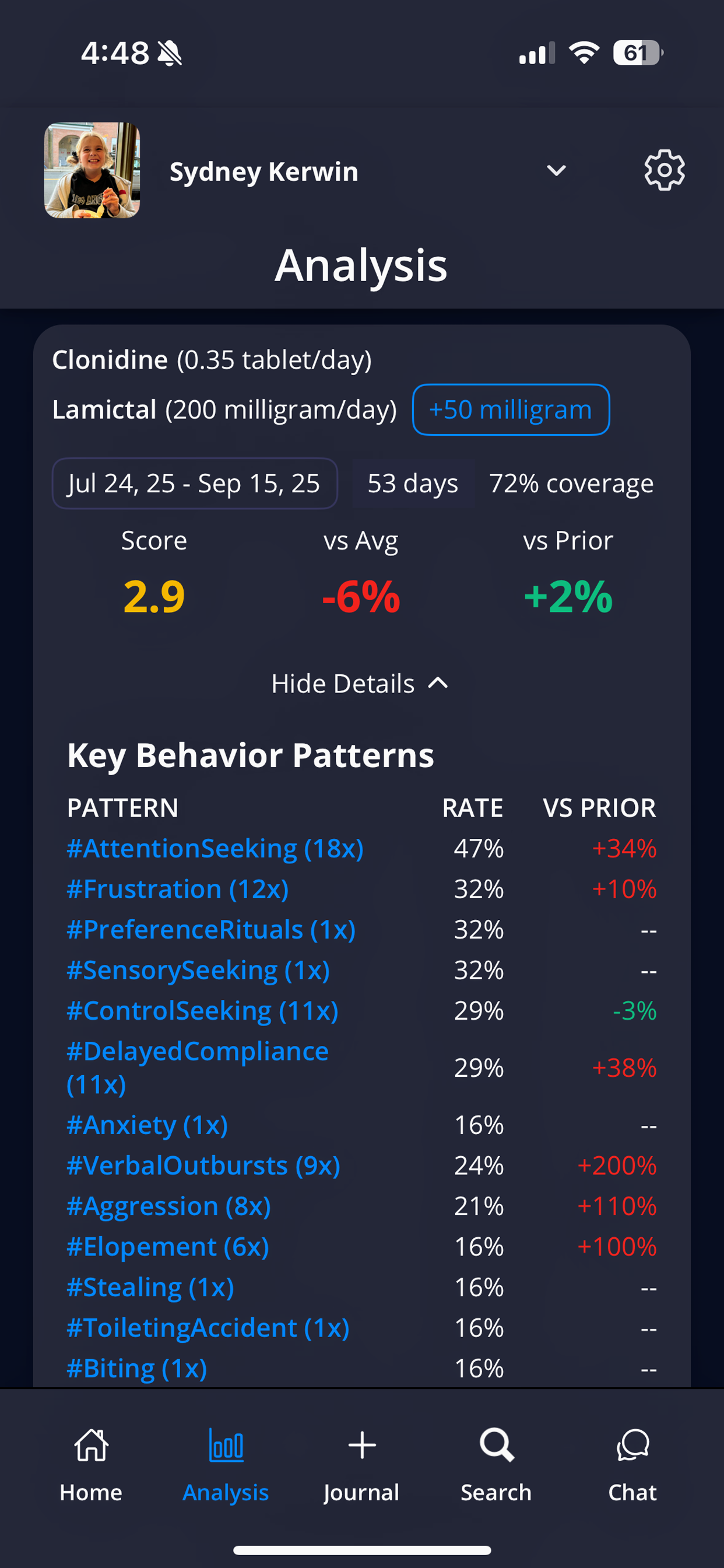
Detailed medication analysis shows specific behavior patterns and their correlation with current medication periods
What's Included: Subset of behavior-related hashtags that changed during this medication period
Focus Areas:
- Behavior Concepts: emotional-dysregulation, impulse-control, attention, hyperactivity
- Incidents: aggression, self-injury, property-destruction, elopement
Why These Specifically:
- Most relevant to medication effectiveness assessment
- Commonly tracked by medical professionals
- Often primary targets of psychiatric medications
- Based on expert-curated hashtag list
How to Read:
- Positive percentages: Decrease in challenging behaviors or increase in positive behaviors
- Negative percentages: Increase in challenging behaviors or decrease in positive behaviors
- Higher absolute percentages: Stronger correlation with medication change
Using Medication Data Effectively
Preparing for Medical Appointments
Data to Bring:
- PDF Export: Complete analysis report including medication effectiveness
- Specific Concerns: Behavior patterns that have changed since medication adjustments
- Time Period Focus: Analysis covering period since last appointment
- Questions Based on Data: Specific observations about effectiveness or side effects
Privacy Consideration: PDF export requires consent acknowledging data will leave VillageMetrics' secure environment
Tracking New Medications
- Baseline Period: Record behavior for a few weeks before starting new medication (if possible)
- Adjustment Period: Be consistent with journal entries during first few weeks of new medication
- Long-term Assessment: Allow 4-6 weeks minimum before drawing conclusions about effectiveness
Interpreting Results
Consider Multiple Factors:
- Coverage Percentage: Low coverage (few journal entries) makes data less reliable
- Time Period: Shorter periods provide less reliable data
- External Changes: School changes, family changes, other interventions starting/stopping
- Developmental Factors: Natural development may affect behavior independent of medications
Red Flags to Discuss with Doctor:
- Significant behavior score decline after medication change
- Increase in safety-related incidents
- New concerning behaviors that weren't present before
- Sleep, appetite, or energy changes noted in journal entries
Medication Safety
Important Reminders:
- VillageMetrics analysis supplements but never replaces medical judgment
- Always follow your doctor's instructions for medication changes
- Never stop or change medications without medical consultation
- Report concerning side effects to your healthcare provider immediately
Medication Data Privacy
Who Can Access Medication Data
Parents/Guardians: Always have full access to medication information and analysis
Caregivers with Medical Data Permission: Can view:
- Medication analysis in Analysis section
- Medication-related hashtags and patterns
- Medication effectiveness comparisons
Caregivers without Medical Data Permission: Cannot access:
- Medication names, dosages, or timing
- Medication analysis section
- Medical-related hashtags or insights
Sharing Medication Information
Within VillageMetrics: Medical data permission controls access within your village
External Sharing:
- PDF exports include medication analysis (requires export consent)
- CSV exports include medication-related columns
- Ask Anything feature can answer medication-related questions for authorized users
Medication tracking becomes more valuable over time as you build a history of different medications, dosages, and their correlations with your child's behavioral patterns. This longitudinal data is invaluable for making informed decisions with your healthcare team.