Behavior Goals & Scoring: Tracking Progress with AI Insights
Behavior goals are the measurable outcomes you want to track for your child. VillageMetrics automatically scores these goals based on your journal entries, creating data-driven insights about your child's progress over time.
Understanding Behavior Goals
What Are Behavior Goals?
Behavior goals are specific, trackable aspects of your child's behavior that you want to monitor and improve. Rather than vague concepts like "be good," behavior goals are concrete and measurable, like "maintain safety" or "follow directions."
How They Work in VillageMetrics
- You record journal entries describing your child's day
- AI analyzes the content and assigns scores to each behavior goal
- Scores are aggregated to show trends and patterns over time
- Analysis reveals what factors help or hinder each goal
Default Behavior Goals
Every child starts with three carefully chosen default behavior goals that apply to most children with behavioral challenges:
1. Followed Directions
What it measures: Your child's ability to understand and comply with instructions from caregivers.
2. Maintained Safety
What it measures: Your child's ability to avoid dangerous situations and make safe choices throughout the day.
3. Stayed Calm During Challenges
What it measures: Your child's emotional regulation when facing difficult or frustrating situations.
Scoring System
How Individual Entries Are Scored
When the AI analyzes your journal entry, it asks for each behavior goal: "Was this goal met today?" and answers using a 1-4 scale:
- 4 - Completely: The goal was fully met
- 3 - Mostly: The goal was generally met with minor issues
- 2 - A little: Some progress toward the goal, but notable struggles
- 1 - Not at all: Significant difficulty with the goal
- NA - Not Applicable: The goal wasn't relevant for this entry
Analysis Labels
When viewing analysis and trends over time, scores are grouped into performance bands:
- Thriving (scores around 4)
- Capable (scores around 3)
- Emerging (scores around 2)
- Struggling (scores around 1)
These labels help you understand overall progress patterns when looking at multiple days together.
Why Automatic Scoring Helps
The AI reads your journal entry and makes its own judgment about whether each goal was met based on the details you provided. This is purely for convenience - you can always click "Details" to see the reasoning or click "Edit" to override any scores you disagree with.
Viewing and Editing Scores
Score Display
Overall Behavior Score: Average of all behavior goals (shown prominently on each journal entry)
Individual Goal Scores: Available in entry details
- Tap "Details" on any journal entry
- See each goal's individual score
- View AI reasoning for each score (up to 2 bullet points explaining the rating)
Manual Score Adjustments
When to Override AI Scores:
- You have context the AI might have missed
- The AI misinterpreted something you said
- You disagree with the severity assessment
- The scoring doesn't match your observation
How to Edit Scores:
- Tap "Edit" on your own journal entries (cannot edit others' entries)
- Select the behavior goal you want to adjust
- Choose new score (1-4) or mark as "Not Applicable"
- Changes immediately update overall score and analysis
Score Reasoning:
- Click "Details" to see why AI selected each score
- Helps you understand the AI's interpretation
- Useful for deciding whether to override the score
Choosing Your Child's Goals
Where to Find Them
Go to Settings, then [Child]'s Profile, then Behavior Goals. The screen shows the goals of the child selected at the top; switch the child there to see another child's goals.
Each journal entry about your child is rated against every active goal, on the scale Not at all, A little, Mostly, or Completely. The screen lists the active goals with their categories, how many are active (for example "4 of 15"), and any archived goals.
Adding a Goal
Only a child's parents can add goals.
- Tap Add a Goal.
- Describe what you'd like to track in your own words, or tap one of the example goals to start from it.
- Tap Continue. VillageMetrics suggests wording that works with the rating scale: short, in the past tense, and answerable with Not at all, A little, Mostly or Completely. If your words already fit, the suggestion is your words unchanged. It also suggests a category: Safety, Compliance, Emotional Regulation, Social Skills, Self Care or Other.
- Edit the suggestion or change the category if you like, then tap Add Goal. When the suggestion differs from what you typed, you can tap Use my original wording instead to save your own words.
The new goal appears in the Active list, and journal entries saved from then on are rated on it. Entries saved before you added it are not rated on it.
Limits:
- A goal can be up to 100 characters.
- A child can have up to 15 active goals. At 15, archive a goal before adding another.
- A goal can't have the same wording as another active goal of the same child.
If wording can't be suggested, for example because the connection dropped, the words you typed are kept and you can tap Continue to try again.
Broad Goals Work Best
Every journal entry is rated on every goal, so choose behaviors that could come up in almost any entry, not just one kind of situation. A goal that applies to many kinds of situations gets rated far more often than one tied to a single situation, such as bedtime.
Example Goals:
- Handled transitions smoothly
- Used words to ask for help
- Got along with others
- Rolled with changes in plans
- Bounced back after getting upset
- Waited patiently
Archiving a Goal
When you no longer want a goal tracked, archive it: tap the archive icon next to the goal and confirm. New journal entries won't be rated on it, its past ratings stay in Analysis, and you can restore it anytime. The three default goals can be archived like any other goal.
A child needs at least one active goal. To replace the last one, add the new goal first, then archive the old one.
Restoring a Goal
Archived goals are listed under Archived, marked "Not rated on new entries". Tap Restore to return a goal to the Active list; journal entries saved afterward are rated on it again. A goal can't be restored if the child already has 15 active goals, or has an active goal with the same wording.
Deleting a Goal Permanently
If you added a goal by mistake or don't want to see it again, you can delete it permanently once it's archived. Archive it first, then tap Delete permanently on it under Archived and confirm. Only a child's parents can delete goals.
Deleting can't be undone. The goal disappears from the Behavior Goals screen, from Analysis and its exported report for every time range, from data exports, and from past journal entries' individual goal scores, and it can't be restored. Its past ratings still count in the overall behavior scores they were part of, so past overall scores, including each journal entry's overall score, don't change.
After deleting a goal, you can add a new goal with the same wording. It starts with no history.
Archived Goals in Analysis
An archived goal still appears in Analysis, labeled "Archived", for any time range that includes ratings for it, and its ratings stay in data exports. Once a time range has no ratings for it, it no longer appears there. A permanently deleted goal doesn't appear in Analysis or data exports at all. Analysis reflects an added, archived, restored or deleted goal from the next daily refresh, so it can lag the Behavior Goals screen by up to a day.
Why Can't I Change a Goal?
Goals can't be reworded. Every past rating was given for the goal as it was worded then. Changing the words would mix those ratings in with ratings for a different goal, and your child's progress charts would stop being accurate. To track something new, archive the old goal and add a new one. The old goal's history is kept.
What Caregivers See
Caregivers who can view the child's behavior data see the active goals, with a note that only the child's parents can add or archive goals. They can't add, archive, restore or delete goals. Caregivers without that permission don't see Behavior Goals in Settings.
Using Behavior Goal Data
Individual Goal Analysis
Location: Analysis > Behavior Goals tab
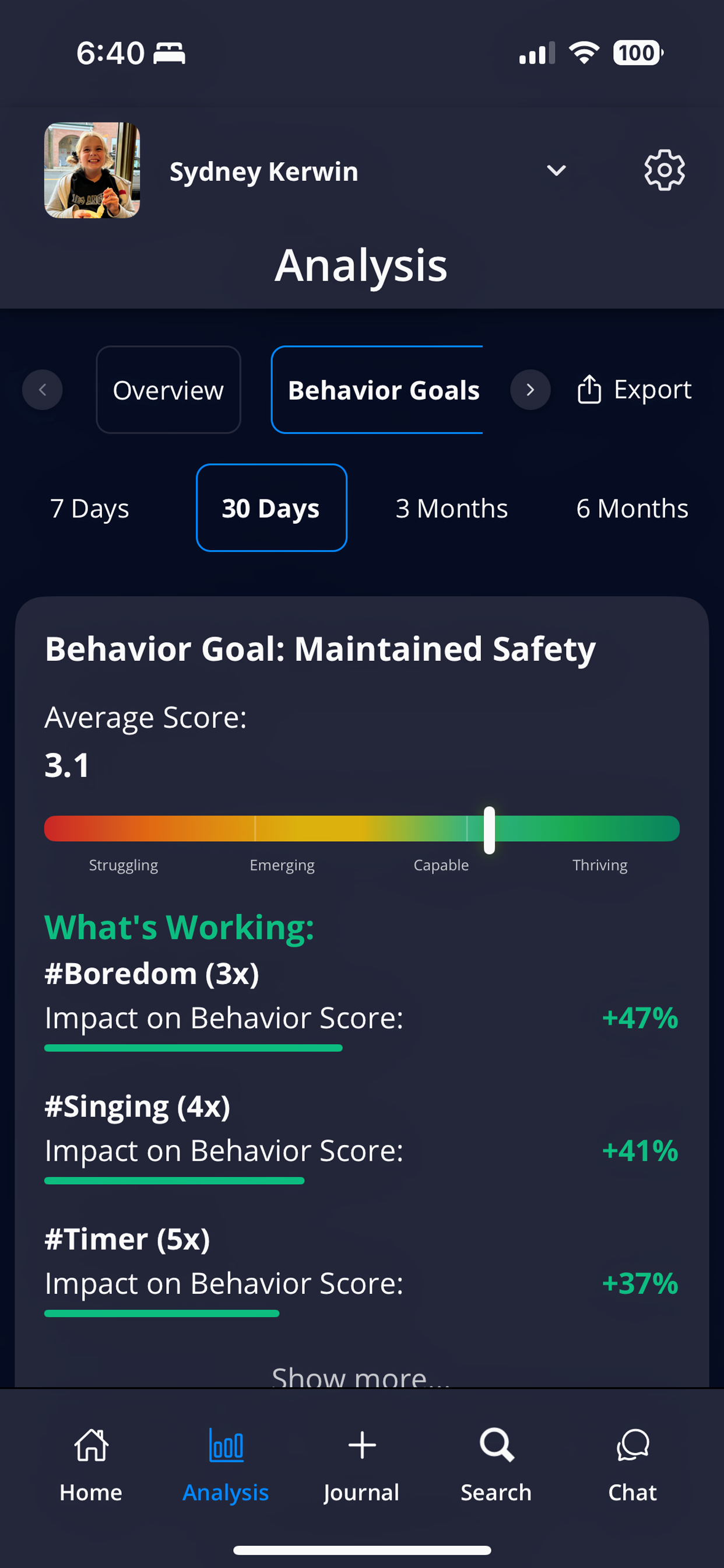
The Behavior Goals tab shows individual goal performance with strategies that work for each specific goal
What You'll See:
- Average score for each goal over selected time period
- Trend chart showing progress over time
- "What's Working" hashtags specific to that goal
- "What's Not Working" hashtags specific to that goal
How This Helps:
- Identify which goals need the most attention
- Understand what strategies work best for specific behaviors
- Track progress on individual goals rather than just overall scores
- Share targeted information with therapists focusing on specific areas
Goal-Specific Insights
Rather than general behavior patterns, you can see:
- Activities that specifically help with safety vs. following directions vs. emotional regulation
- Times of day when certain goals are more challenging
- Caregiver strategies that work best for each specific goal
- Environmental factors that support or hinder individual goals
Best Practices for Behavior Goals
Setting Realistic Expectations
- Start with Defaults: The three default goals provide a solid foundation for most children
- Add Gradually: Introduce new goals one at a time to avoid overwhelming data
- Keep Goals Broad: Choose behaviors that could come up in almost any journal entry, so each goal gets rated often
Consistent Application
- Same Standards: Ensure all village members understand what each goal means
- Regular Review: Periodically discuss goals with your team to maintain consistency
- Age-Appropriate: Adjust expectations as your child develops and grows
Using Scores Effectively
- Focus on Trends: Daily variations are normal - look at weekly and monthly patterns
- Celebrate Progress: Acknowledge improvements even if scores aren't perfect
- Identify Patterns: Use low-scoring periods to understand triggers and develop strategies
- Share with Team: Behavior goal data is valuable for IEP meetings, therapy planning, and medical consultations
Working with Your Child's Team
- IEP Goals: Align behavior goals with school IEP objectives when possible
- Therapy Targets: Coordinate with ABA therapists to track their program goals
- Medical Consultations: Use behavior goal trends to inform medication discussions
- Family Meetings: Review progress regularly and adjust strategies based on data
Behavior goals transform subjective observations into objective data, helping you make informed decisions about your child's care and track meaningful progress over time.