External AI Integration: Connecting Village Metrics with Claude
Connect external AI assistants like Claude Desktop to your Village Metrics data using Model Context Protocol (MCP). This lets you ask questions about your child's behavioral data directly within your preferred AI assistant.
Advanced Feature
AI Tools Integration is designed for users who want to use external AI assistants. Most users will find the built-in Ask Anything chat feature sufficient for their needs.
Desktop App Required
Important: MCP integration requires Claude Desktop - it does not work in the browser version of Claude. If you use Claude primarily in your browser, see the Browser Users section for alternatives.
What is AI Tools Integration?
AI Tools Integration allows external AI assistants to securely access your Village Metrics data. Instead of manually copying data between apps, your AI assistant can directly retrieve behavioral scores, journal entries, and analysis insights.
What you can do:
- Ask Claude Desktop about your child's behavior patterns
- Get medication effectiveness analysis in your AI assistant of choice
- Search journal entries using natural language within external tools
- Generate insights and summaries using any MCP-compatible AI agent
Privacy & Security:
- Uses specialized MCP tokens with limited permissions (not your main account password)
- All data access is logged and follows strict privacy and security standards
- You control token expiration and can revoke access at any time
- No data is stored by the AI assistant - it's accessed in real-time from Village Metrics
Getting Your MCP Token
Step 1: Generate Token in Village Metrics App
- Open the Village Metrics mobile app
- Navigate to Settings → Connect AI Tools
- Click "Generate Token"
- Review and accept the consent terms
- Choose your token expiration period:
- 90 Days: For occasional use
- 1 Year: For regular use
- 2 Years: For power users
- Copy the generated token (starts with
vm_mcp_)
Keep Your Token Secure
Treat your MCP token like a password. Don't share it or post it online. Anyone with this token can access your child's behavioral data.
Step 2: Token Format
Your MCP token will look like this:
Save this token - you'll need it for configuring your AI assistant.
MCP Compatibility Note
Desktop App Required
MCP (Model Context Protocol) is only supported in Claude Desktop, not in the browser version at claude.ai. If you primarily use Claude in your web browser, you'll need to download and use Claude Desktop to access your Village Metrics data.
Setting Up Claude Desktop
Step 1: Install Claude Desktop
Download Claude Desktop from Anthropic's official website.
Configuration Help
For the most up-to-date Claude Desktop configuration instructions, you can also refer to Anthropic's official documentation or the help section within Claude Desktop itself.
Step 2: Configure MCP Integration
- Access configuration through Claude Desktop's menu:
- Open Claude Desktop
- Go to Settings (or Claude Desktop → Settings on Mac)
- Navigate to the Developer section
- Click "Edit Config" button
-
This will open the configuration file in your default text editor or show you the exact file location
-
Edit the config file (if the file doesn't exist, create it at the location shown):
{
  "mcpServers": {
    "village-metrics": {
      "command": "npx",
      "args": ["@villagemetrics-public/ask-anything-mcp"],
      "env": {
        "VM_MCP_TOKEN": "vm_mcp_xxxx_xxxx_xxxx_xxxx",
        "VM_API_BASE_URL": "https://api.villagemetrics.com"
      }
    }
  }
}
- Replace the token: Change
vm_mcp_xxxx_xxxx_xxxx_xxxxto your actual token from Step 1.
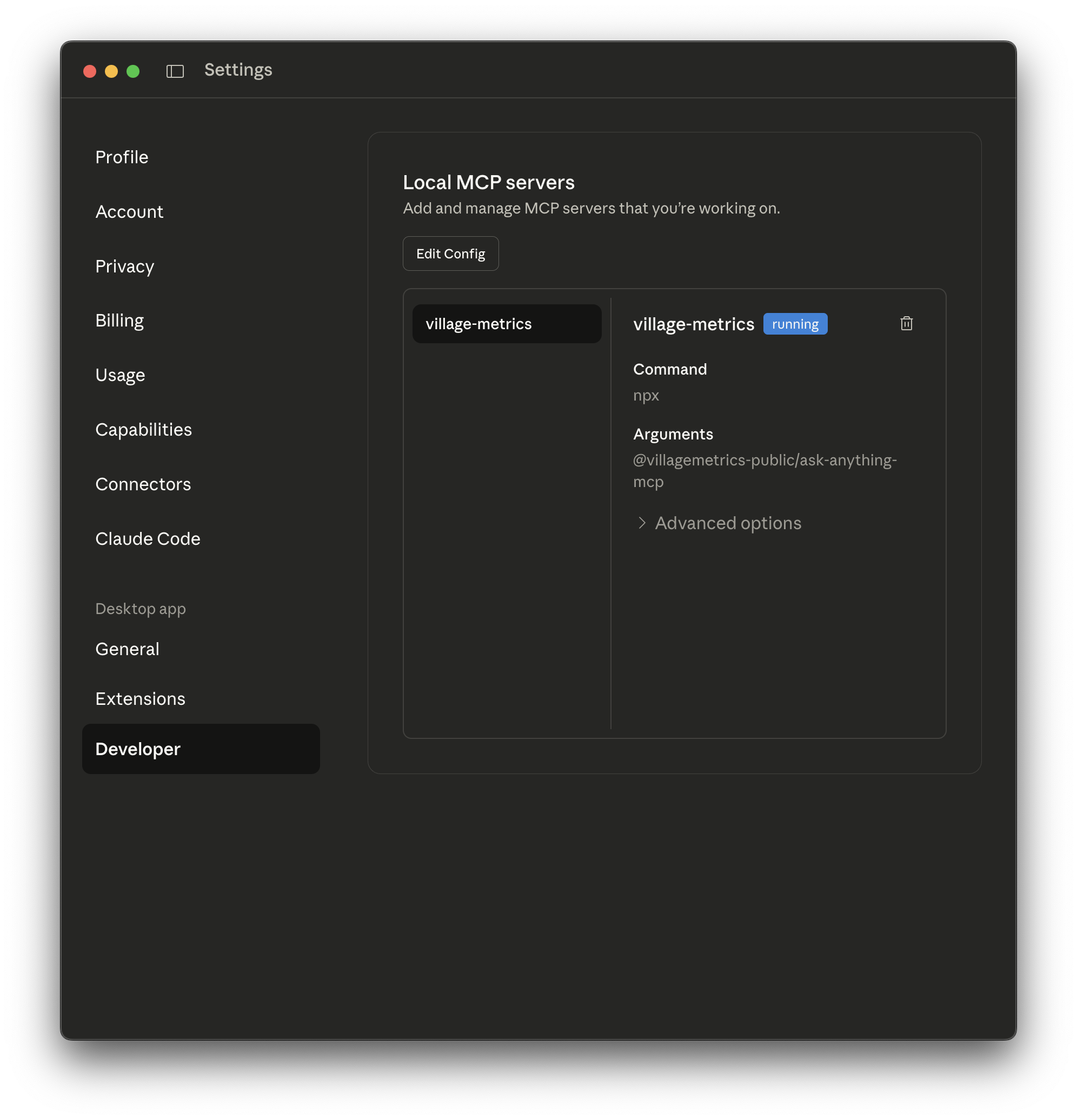
The Developer settings in Claude Desktop showing the village-metrics MCP server configured and running
Step 3: Restart Claude Desktop
Completely quit and restart Claude Desktop for the configuration to take effect.
Step 4: Test the Connection
Start a new conversation in Claude Desktop and try these questions:
If working correctly, Claude will access your Village Metrics data and provide insights about your child's behavioral patterns, recent journal entries, and analysis trends.
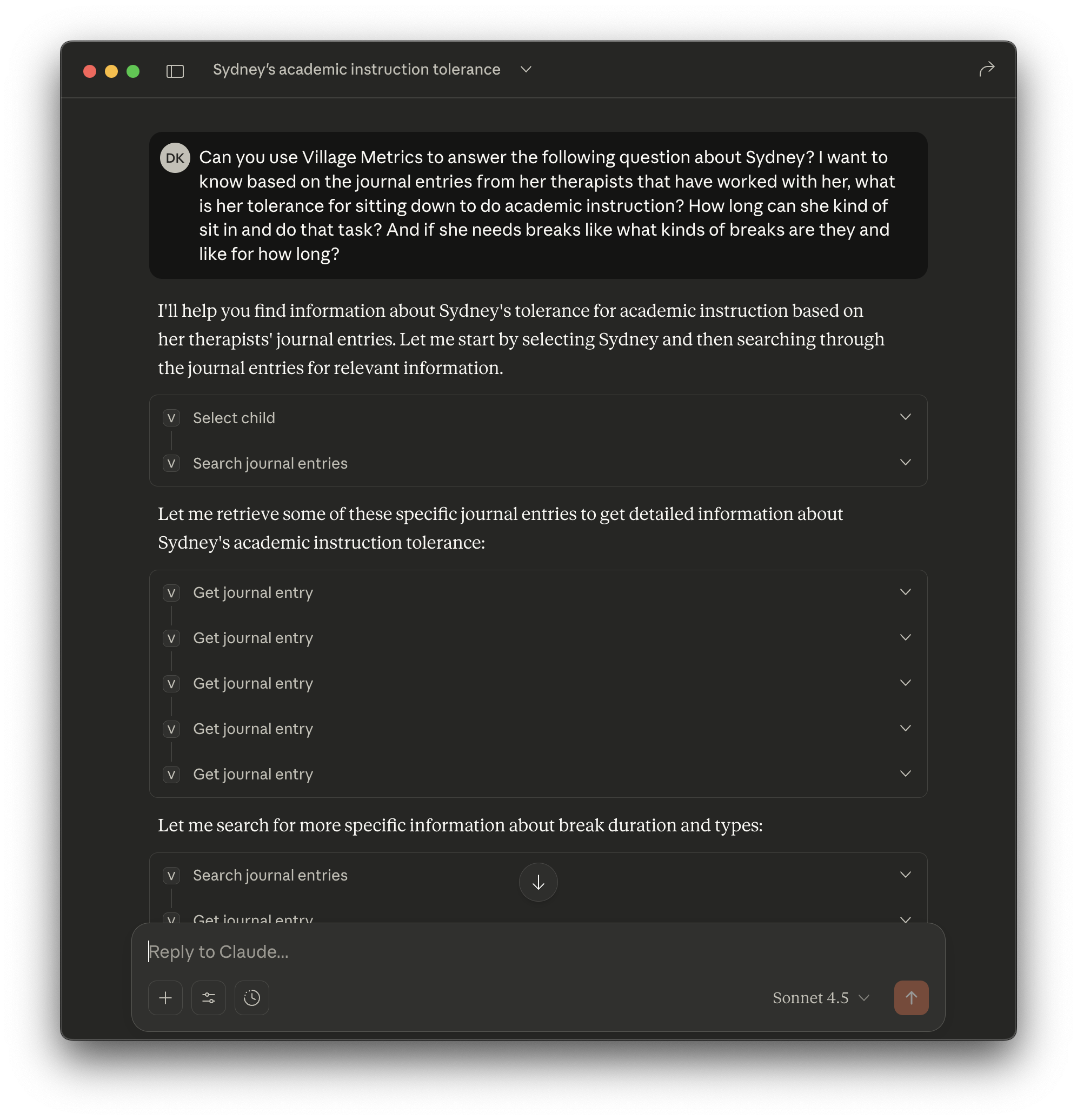
Example of Claude Desktop using the VillageMetrics MCP integration to answer questions about a child's behavior patterns by accessing journal entries
Browser Users: Alternative Approach
Can't use MCP with Claude in your browser? Since most users prefer the browser version of Claude, here are alternative approaches:
Option 1: Use Built-In Ask Anything Instead (Recommended)
If you prefer to stay in the browser:
- Use Village Metrics' built-in Ask Anything feature (in the mobile app)
- It provides similar capabilities to the MCP integration
- Access through: Main menu → Search → Ask Anything tab
- No additional setup required - just start asking questions about your data
Option 2: Switch to Claude Desktop
- Download Claude Desktop for full MCP integration
- All your conversations and history will sync between browser and desktop versions
- You can still use Claude in your browser for other tasks
- As of now, MCP isn't supported in Claude's browser version, but this may change in the future
Best Approach
Most browser users find the built-in Ask Anything feature meets all their needs without any setup. If you want the flexibility of using your own AI assistant, Claude Desktop is your best option.
Other MCP-Compatible AI Assistants
Currently, Claude Desktop is the primary AI assistant with robust MCP support. The Model Context Protocol is still a relatively new standard, and the ecosystem is actively developing.
General MCP Configuration
For any MCP-compatible client, you'll need:
- Command:
npx @villagemetrics-public/ask-anything-mcp -
Environment Variables:
-
VM_MCP_TOKEN: Your token from Village Metrics app VM_API_BASE_URL: "https://api.villagemetrics.com" (optional - defaults to production API)
Current Status of Other AI Assistants
OpenAI ChatGPT:
- ❌ Currently does not support MCP
- OpenAI is developing their own tool integration system
- Village Metrics may support OpenAI's system when available
Other AI Assistants:
- MCP is an open standard, so other AI assistants may add support over time
- Most current alternatives are experimental or in early development
- Check Anthropic's MCP documentation for updates on new MCP clients
Expanding Ecosystem
MCP adoption is growing, but Claude Desktop remains the most reliable option. We recommend starting with Claude Desktop and will update this documentation as other mature MCP clients become available.
What You Can Ask About
Once connected, you can have natural conversations with your AI assistant about your child's data:
Understanding Patterns
- "What triggers seem to lead to difficult days for Emma?"
- "Which activities help calm down tantrums?"
- "How does my child's behavior differ on school days vs weekends?"
- "What time of day are meltdowns most common?"
Tracking Progress
- "Is my child's behavior improving since we started the new routine?"
- "How has this month compared to last month?"
- "What's been working well according to our journal entries?"
- "Are we seeing fewer aggressive episodes than before?"
Medication & Treatment Insights
- "How has behavior changed since starting the new medication?"
- "Which medication period had the best results?"
- "What behavioral improvements have we seen with therapy?"
Getting Caught Up
- "Summarize how this week has been while I was traveling"
- "What should I know for tomorrow's doctor appointment?"
- "What patterns should I share with the teacher?"
- "Give me highlights from the past month"
Comparing Caregivers
- "How is my child's behavior different with various family members?"
- "What strategies work best for different caregivers?"
- "Which approaches seem most effective during difficult moments?"
Troubleshooting
"Invalid Token" Errors
Check token expiration: - MCP tokens expire based on your selected period - Generate a new token if expired: Settings → Connect AI Tools
Verify token format:
- Should start with vm_mcp_
- No extra spaces or characters
- Copy the complete token
Connection Issues
Claude Desktop won't connect:
- Verify you're using Claude Desktop (not the browser version at claude.ai)
- Use the Settings → Developer → "Edit Config" button to ensure you're editing the correct config file
- Ensure Node.js is installed on your system
- Restart Claude Desktop completely after config changes
- If issues persist, check Claude Desktop logs (accessible through the app's help menu)
"Command not found" errors:
- The @villagemetrics-public/ask-anything-mcp package installs automatically
- If issues persist, try: npm install -g @villagemetrics-public/ask-anything-mcp
Performance Issues
Slow responses: - MCP queries access real-time data, so responses may take a few seconds - Large date ranges or complex queries take longer - This is normal behavior
Incomplete responses: - Try rephrasing your question - Be more specific about date ranges - Break complex questions into smaller parts
Best Practices
Effective Questions
Be specific about timeframes:
Include relevant context:
Ask follow-up questions: - Build on previous responses in the same conversation - Ask for more details or examples - Request specific data points
Privacy & Security
Token Management: - Set shorter expiration periods if you use AI tools infrequently - Generate new tokens periodically for security - Immediately revoke tokens if you suspect compromise
Data Sensitivity: - Remember that AI assistants may retain conversation history - Don't include personally identifiable information in your questions - Use child's first name or "my child" rather than full names
Managing Multiple Children
If you have multiple children in Village Metrics:
- Always select the child first: "Select [child name]"
- Be explicit in questions: "For Sydney, what were the behavior scores yesterday?"
- Switch children as needed: "Now select Emma"
Getting Help
Technical Support
Village Metrics Support: - Email: hello@villagemetrics.com - Include your MCP token ID (not the full token) in support requests
MCP Resources: - Anthropic's MCP Documentation - Claude Desktop Support
Common Questions
Q: Can I use multiple AI assistants with the same token? A: Yes, the same MCP token works with any number of MCP-compatible clients.
Q: Will this affect my Village Metrics app usage?
A: No, MCP integration is completely separate from your normal app usage.
Q: Can other village members see my AI assistant conversations? A: No, AI assistant conversations are private and not stored in Village Metrics.
Q: What happens if I delete a child from Village Metrics? A: The AI assistant will no longer have access to that child's data.
AI Tools Integration opens up powerful possibilities for analyzing your child's behavioral data. Start with simple questions and experiment to discover what insights you can uncover!