Exporting Behavior Data: Generating PDF Reports for Doctors
VillageMetrics provides multiple ways to export and share your child's data while maintaining strict privacy protections. Understanding these features helps you make informed decisions about when and how to share your child's information.
Overview of Export Options
Available Export Types
- PDF Analysis Reports: Complete analysis exported as professional report
- CSV Raw Data Export: Journal entries and data in spreadsheet format
- Clipboard Copy: Copy specific content to device clipboard
- Future: Secure Links: Planned feature for secure, privacy-protected sharing
Privacy Consent Requirements
All export features require explicit consent because they move protected health information (PHI) outside of VillageMetrics' secure environment.
Key Risk: Once data leaves VillageMetrics, it may be handled by apps or services that are not HIPAA compliant.
PDF Analysis Export
What's Included
Complete Analysis Report containing:
- Overview analysis with behavior trends and enhancers/triggers
- Individual behavior goal analysis and patterns
- Journal entry summaries and key moments
- Hashtag analysis across all categories
- Medication effectiveness analysis (if configured)
- Charts, graphs, and visualizations from the Analysis section
How to Export PDF
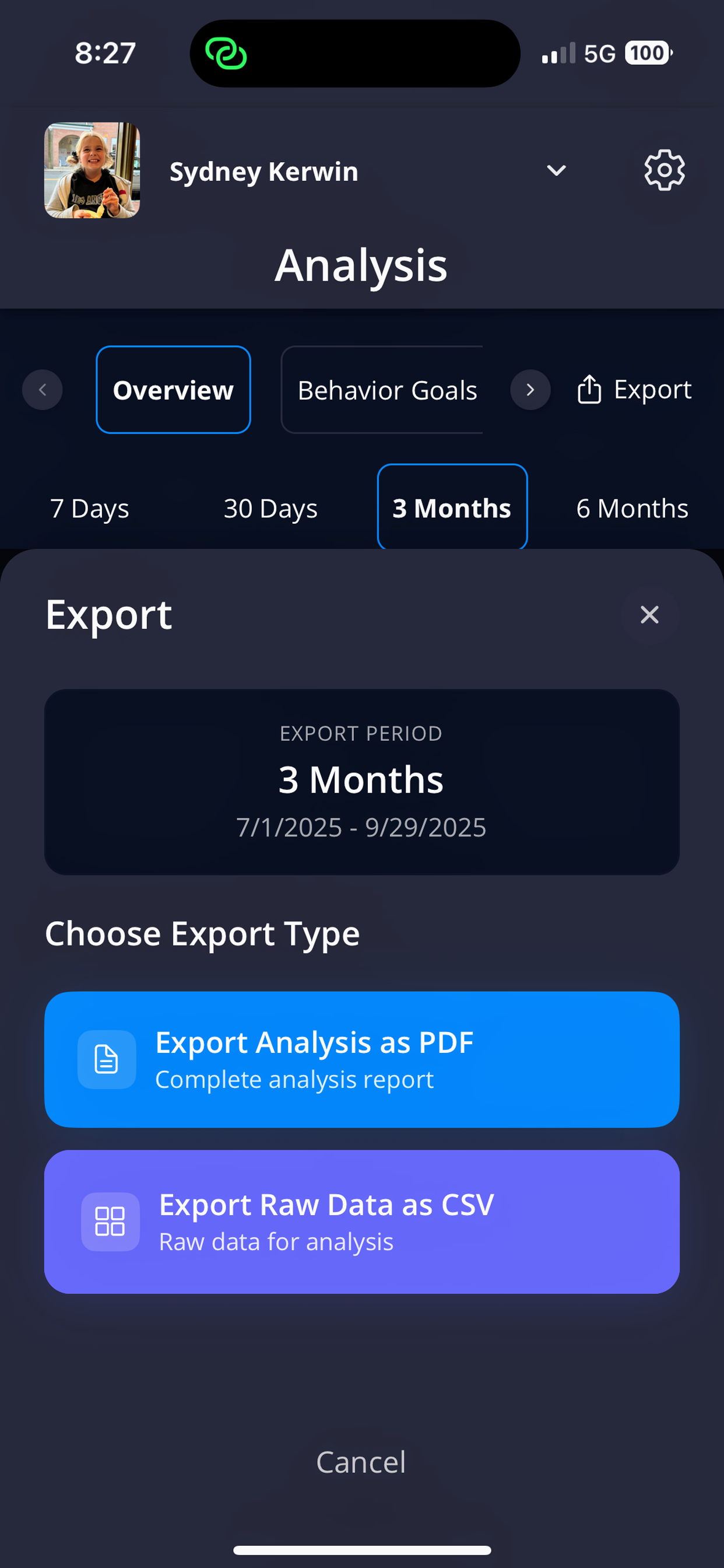
The export dialog lets you choose between PDF analysis reports and CSV raw data exports
Location: Analysis section → Export button (upper right corner)
Export Process:
- Consent Dialog: First-time use requires agreeing to data sharing risks
- PDF Generation: VillageMetrics creates comprehensive PDF report
- System Share Sheet: Your device's native sharing options appear
- Choose Destination: Email, text, cloud storage, or other apps
Time Period: PDF includes data for whatever time period you have currently selected in Analysis (7 days, 30 days, 3 months, or 6 months).
PDF Report Features
- Professional Formatting: Designed for sharing with healthcare providers, therapists, educators
- Complete Data: All analysis sections included in single document
- Visual Elements: Charts and graphs included for easy interpretation
- Date Range Clearly Marked: Shows exactly what time period the report covers
Privacy Consent for PDF Export
Required Agreement: "You're about to share your child's data. This export may include protected health information. Once you share it outside Village Metrics, the data may be handled by apps or services that are not HIPAA compliant. By continuing, you authorize this export and accept that Village Metrics cannot control or secure the data once it leaves the app."
- One-Time Consent: Once you agree, the setting is saved and you won't be asked again
- Revocable: Can be disabled later in Settings → Data Sharing → Data Export Access
CSV Raw Data Export
What's Included
Raw Journal Entries in spreadsheet format with columns for:
- Full journal entry transcript (AI-cleaned version)
- Date and time of entry
- Author (village member who created entry)
- Overall behavior score
- Individual behavior goal scores
- Key hashtags
- Entry metadata
Use Cases for CSV Export
- Personal Record Keeping: Maintain your own backup of journal data
- Advanced Analysis: Import into Excel, Google Sheets, or other analysis tools
- Research Participation: Provide anonymized data for research studies (with additional consent)
- Long-term Archives: Keep permanent family records
Time Period Selection
CSV export respects the currently selected time period in Analysis, allowing you to export:
- Recent data only (7 days, 30 days)
- Longer periods (3 months, 6 months)
- Historical data from specific time ranges
Data Ownership
- Your Data: As a parent, you own all journal entry data about your child
- Complete Access: No restrictions on exporting your own family's data
- Village Contributions: Includes entries from all village members (they contribute to your child's record)
Clipboard Features
What Can Be Copied
From Journal Entries:
- Full transcript text
- Entry summaries and titles
- Specific insights or analysis sections
- Individual hashtags or behavior scores
From Analysis:
- Behavior enhancer/trigger lists
- Specific analysis text
- Individual data points
How Clipboard Works
- Copy Icon: Look for clipboard icon next to copyable content
- Device Clipboard: Content copied to your device's standard clipboard
- Paste Anywhere: Use in other apps, documents, messages, etc.
Privacy Consent for Clipboard
Individual Clipboard Access
Personal Consent Required: Each user must consent to clipboard risks for themselves
Consent Language: "Copied text may include protected health information. Once copied to your device's clipboard, it may be accessible outside Village Metrics and may sync with other apps or services that are not HIPAA compliant. You authorize this action and accept that Village Metrics cannot control or secure the data once it is copied to your clipboard."
Setting Location: Settings → Data Sharing → Clipboard Data Access
Caregiver Clipboard Access
Additional Permission Required: Separate consent needed for caregivers to use clipboard features
Why Separate: Allows parents to control whether village members can copy PHI outside the app
Multi-Parent Consent: If child has two parents, BOTH must enable caregiver clipboard access
- Feature remains blocked until both parents consent
- Either parent can revoke access for all caregivers
Use Case: Helpful for ABA therapists who want to copy session notes into their practice management systems
Consent Language: "You are granting permission for all caregivers in your child's village to copy text that may include protected health information to their devices' clipboard. Once copied, this data may be accessible outside Village Metrics and may sync with other apps or services that are not HIPAA compliant. Important: If your child has multiple parents or guardians, all parents or guardians must enable this setting for caregiver clipboard access."
Managing Clipboard Settings
- Location: Settings → Data Sharing
-
Options Available:
-
Clipboard Data Access: Your personal clipboard permission
- Caregiver Clipboard Access: Whether village members can use clipboard
- Toggle On/Off: Enable or disable at any time
- Immediate Effect: Changes take effect immediately for all users
Sharing Use Cases
Healthcare Provider Consultations
PDF Reports Ideal For:
- Psychiatrist appointments (medication effectiveness data)
- Pediatrician visits (overall behavior trends)
- Therapy team meetings (comprehensive analysis)
- IEP meetings (school behavior patterns)
What to Include:
- Select appropriate time period (since last visit)
- Focus on relevant sections (medication analysis for psychiatrist, behavior goals for school team)
- Prepare specific questions based on data
Insurance and Documentation
CSV Export For:
- Insurance claims requiring detailed behavior logs
- Disability services applications
- Legal proceedings requiring comprehensive records
- Research study participation
Team Collaboration
Clipboard Copy For:
- Quick sharing of specific insights with immediate team members
- Copying successful strategies to share in team meetings
- Including specific data points in emails or messages
- Adding journal excerpts to other documentation
Privacy Best Practices
Before Exporting
- Consider the Audience: Who will see this data and do they need all of it?
- Select Time Periods Carefully: Include only relevant date ranges
- Review Content: Understand what PHI is included in your export
- Secure Destinations: Choose secure methods for sharing (encrypted email, secure file sharing)
After Exporting
- Secure Storage: Store exported files in password-protected locations
- Limited Distribution: Share only with people who need access
- Disposal: Delete exported files when no longer needed
- Follow Recipient Guidelines: Ensure recipients handle data appropriately
Revoking Access
- Immediate Revocation: Disable export permissions in Settings
- Cannot Recall: Data already exported cannot be retrieved
- Future Prevention: Revoked permissions prevent future exports
- Inform Recipients: Let people know if you've revoked their access to new data
Troubleshooting Export Issues
Common Problems
- PDF Won't Generate: Check internet connection, try different time period
- CSV Export Empty: Ensure selected time period has journal entries
- Clipboard Not Working: Check that clipboard access is enabled in Settings
- Share Sheet Not Appearing: Restart app, check device permissions
Export Delays
- Large Data Sets: Longer time periods may take more time to process
- Peak Usage: Export generation may be slower during high-usage periods
- Network Issues: Poor internet connection can cause export failures
Data export and sharing features are powerful tools for collaborating with your child's care team and maintaining comprehensive records. Use them thoughtfully with full understanding of the privacy implications and benefits they provide.